Thursday, 3 October 2013

Add Shortcuts to Web Apps in Chrome for Android

The latest release of Chrome Beta for Android lets you add to the home screen a shortcut to the page you're currently visiting. Until now, you had to bookmark the page, go to the new tab page, long tap the bookmark and select "add to home screen". If you use the latest Chrome Beta, you can open the Chrome menu and tap "add to home screen".

There's even a bonus feature: "Sites launched in this way will open in a normal Chrome for Android window, unless they include the mobile-web-app-capable meta tag. Those sites will instead open in a special fullscreen Chrome for Android window that doesn't display tabs, buttons, menus, or the Omnibox. Try adding a shortcut to weight.aerotwist.com to see this in action."


This is a good news for web apps fans and it's nice to see that a feature that was available in iPhoneOS 1.x finally finds its way to the mobile Chrome. Unfortunately, Chrome for iOS won't add a similar feature because third-party iOS apps can't add shortcuts.

Another new feature integrates Chrome with Google Wallet. "requestAutocomplete() makes it easier for users to fill out online forms by offering web developers programmatic access to the browser's autocomplete information (with the user's explicit permission). For this first release, we've made it work for web payments. On sites with requestAutocomplete(), users will be able to either use their existing payment data stored with the browser or enter new details through a browser-provided interface." This works in Chrome Beta for Android, Windows, and Chrome OS.

Google Now Updates for Notable People

After adding support for reminders about the latest releases from your favorite music artists and actors, Google Now lets you subscribe to updates when you search for notable people. Just click "Keep me updated" in the Knowledge Graph card from Google's search results page and you'll get the latest news articles about that person in Google Now.


Google Now also shows cards for "breaking news and other developing stories you may be interested in", based on your web history.

It's not clear if the new updates feature will replace the reminders feature. Right now, a search for [U2] shows "Remind you about new releases", while a search for [Madonna] shows "Get updates about Madonna".

"Keeping up with the latest information about your favorite musicians, movie stars and other notable people just got easier thanks to the Knowledge Graph and Google Now," informs Google. "Say that you're a Lady Gaga fan and like staying informed about her latest album releases. On the Google Search App, search for [lady gaga]. On the card that pops up, tap 'Remind you about new releases?' and Google Now will keep you updated on your phone or tablet. Similarly, use Google Now to stay in the know about your favorite athletes. For example, search for [colin kaepernick] and tap 'Get updates about Colin Kaepernick' on his card; doing so lets Google Now know that you'd like to receive news. Remember that to use this feature, you'll need to be signed into your Google account on the Google Search App."

Well, I don't see 'Remind you about new releases?' when searching for [Lady Gaga].

YouTube Updates Center-Aligned UI, Adds Carousel

YouTube's experimental interface now uses carousels on the homepage, so it can show more videos from a channel. Video thumbnails are also much bigger. The regular interface also uses carousels, but only when you are signed in.

It's another version of the center-aligned layout, which uses a persistent header, a guide sidebar that's visible only when you click "Guide" and a card-style interface.


Here's how you can enable the experimental feature. If you use Chrome, Firefox, Opera, Safari or Internet Explorer 8+:

1. open youtube.com in a new tab

2. load your browser's developer console:

* Chrome or Opera 15+ - press Ctrl+Shift+J for Windows/Linux/ChromeOS or Command-Option-J for Mac

* Firefox - press Ctrl+Shift+K for Windows/Linux or Command-Option-K for Mac

* Internet Explorer 8+ - press F12 and select the "Console" tab

* Safari 6 - if you haven't enabled the Develop menu, open Preferences from the Safari menu, go to the Advanced tab and check "Show Develop menu in menu bar". Close Preferences and then press Command-Option-C to show the console.

* Opera 12 - press Ctrl+Shift+I for Windows/Linux or Command-Option-I for Mac, then click "Console".

3. paste the following code which changes a YouTube cookie:

document.cookie="VISITOR_INFO1_LIVE=lnq3tYnrDNU; path=/; domain=.youtube.com";window.location.reload();

4. press Enter and close the console.

To go back to the regular interface, use the same instructions, but replace the code from step 3 with this one:

document.cookie="VISITOR_INFO1_LIVE=; path=/; domain=.youtube.com";window.location.reload();

{ Thanks, Rubén and Ramona Brown. }

Google Buys Flutter, Gesture Recognition App

Google acquired Flutter, a startup that built a software that lets you control music and movies with gestures. The desktop software uses your computer's webcam to detect your gestures. "Just put your hand up to stop the media playback, point your thumb right for 'next' and left for 'previous'," reports ArsTechnica.


You can still download the apps for Windows and Mac OS X. The software supports media players like iTunes, Windows Media Player, Winamp, Spotify, VLC, but also sites like YouTube, Netflix and Pandora using a Chrome extension.


Gestures are intuitive, but detection didn't work that well for me.


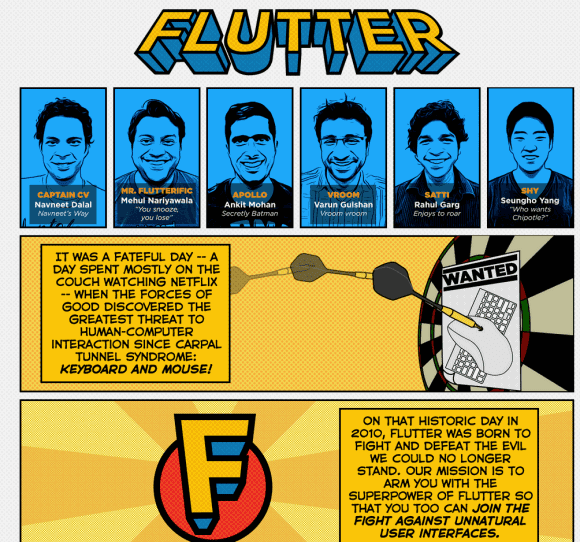
Flutter's comic-style site asks users to join "the fight against unnatural user interfaces".


"When we started three years ago, our dream to build a ubiquitous and power-efficient gesture recognition technology was considered by many as just 'a dream', not a real possibility. Since then, we have strived to build the best machine vision algorithms and a delightful user experience. Today, we are thrilled to announce that we will be continuing our research at Google. We share Google's passion for 10x thinking, and we're excited to add their rocket fuel to our journey," wrote Navneet Dalal, Flutter's CEO.

From touch interfaces, voice-driven user interfaces to gesture recognition, object recognition, facial recognition and biometric scanning, it looks like computers will change dramatically and natural user interfaces will make computers disappear into the background. Xbox Kinect, Google Glass, smartwatches and other wearable computers, flexible screens are probably just the beginning.

{ via ArsTechnica }

Wednesday, 2 October 2013

Restrict Chrome's Omibox Suggestions to Web Searches

What to do if you only want to see web search suggestions in Chrome's omnibox, not suggestions from Google's top results, your bookmarks, your browsing history or previously typed URLs. Type ? in the omnibox and then start typing your query. You can also use these keyboard shortcuts: Ctrl+K or Ctrl+E for Windows and Linux, ⌘-Option-F for Mac.


Chrome will still show suggestions from your previous searches. If you use this trick in the incognito mode, Chrome will only show suggestions from your search history.

Add a Keyboard Shortcut for Chrome's App Launcher

I'm not sure why Chrome's app launcher doesn't have a keyboard shortcut, but it's pretty easy to add one. For Windows XP, right-click the desktop shortcut for Chrome App Launcher and select "Properties", go to the "Shortcut key" field and enter a keyboard shortcut. If you use Windows 7 or 8, press Shift while right-clicking the colorful grid icon from the taskbar, select "Properties", go to the "Shortcut key" field and enter a keyboard shortcut. I picked Ctrl+Shift+A.


Now I can just press Ctrl+Shift+A and the launcher will show up. I can type a Google query, the first letters from a Chrome app or just use the arrow keys to pick an app.


Google now even shows suggestions from the Chrome Web Store, so you can quickly install apps without visiting the store. I wouldn't recommend doing that, unless you really trust the app. For example, you can search for "gmail" and quickly install Gmail Offline.

Google's Hardware Projects: Amazon Best Sellers

Who knew that Google can create successful hardware? Who knew that Chromebooks could become the best selling computers at Amazon.com? Who knew that Nexus devices could become popular?

Electronics best seller - Chromecast


Laptops best seller - Samsung Chromebook


Most popular laptops under $500 - #1: Samsung Chromebook, #3: Acer Chromebook


Most wished for electronics - #1: Chromecast, #6: Samsung Chromebook


Tablets best sellers - #3: Nexus 7


So what are the reasons why Google's hardware projects are suddenly successful? OEM partners like Samsung, Acer and Asus, low prices, high-quality hardware, the focus on user experience, Google Play and the popularity of Chrome and Android.