Showing posts with label Knowledge. Show all posts

Thursday, 3 October 2013

Google Now Updates for Notable People

After adding support for reminders about the latest releases from your favorite music artists and actors, Google Now lets you subscribe to updates when you search for notable people. Just click "Keep me updated" in the Knowledge Graph card from Google's search results page and you'll get the latest news articles about that person in Google Now.


Google Now also shows cards for "breaking news and other developing stories you may be interested in", based on your web history.

It's not clear if the new updates feature will replace the reminders feature. Right now, a search for [U2] shows "Remind you about new releases", while a search for [Madonna] shows "Get updates about Madonna".

"Keeping up with the latest information about your favorite musicians, movie stars and other notable people just got easier thanks to the Knowledge Graph and Google Now," informs Google. "Say that you're a Lady Gaga fan and like staying informed about her latest album releases. On the Google Search App, search for [lady gaga]. On the card that pops up, tap 'Remind you about new releases?' and Google Now will keep you updated on your phone or tablet. Similarly, use Google Now to stay in the know about your favorite athletes. For example, search for [colin kaepernick] and tap 'Get updates about Colin Kaepernick' on his card; doing so lets Google Now know that you'd like to receive news. Remember that to use this feature, you'll need to be signed into your Google account on the Google Search App."

Well, I don't see 'Remind you about new releases?' when searching for [Lady Gaga].

Wednesday, 2 October 2013

Google and Brandy: A Sober Mistake

When you search Google for [brandy] or [brandy drinks], you'll get a Knowledge Graph card with information from Wikipedia: "Brandy is a spirit produced by distilling wine. Brandy generally contains 35–60% alcohol by volume and is typically taken as an after-dinner drink." Unfortunately, the photo that illustrates the card is not appropriate: it shows the popular singer Brandy, not the alcoholic beverage.


The photo is from an article about drinks and the caption says: "If this is the first brandy you think of, you need to get out more". Well, this shows that Google's algorithms are far from perfect.

{ Thanks, Sébastien Izouaouen, Sushubh Mittal and Max Kemman. }

Monday, 30 September 2013

Google's Music Carousel

Remember the post about Google's new music video results? They're used by a Knowledge Graph carousel that shows a long list of songs when you search for things like [Moby songs], [Michael Jackson music], [Nina Simone list of songs], [Beatles track list].


Click one of the songs and you'll see the search results for that song's name. The top result is a music video from YouTube, which has a huge thumbnail. The video doesn't play inline, the thumbnail only links to a regular YouTube page.


You'll see the same interface if you search for a music artist and click one of the songs from the Knowledge Graph sidebar. You can also append "albums" to the query, click one of the albums and you'll see a list of all the songs from the album. Search for [Moby Wait for me songs] and you'll find a list of the songs from Moby's Wait for Me album.


It would be nice to play songs from the Google search results page. Even a short Google Play preview would be pretty useful. If that's not possible, then Google could embed YouTube's player, so you can watch music videos without opening a new page. Another improvement would be to automatically generate a YouTube playlist from all the music videos listed in the carousel, like YouTube does.

{ via Search Engine Roundtable }

Thursday, 26 September 2013

Filter and Compare Knowledge Graph Results

Google's Knowledge Graph feature gets smarter every day. You've probably noticed the carousel that's displayed when you search for things like [dog breeds], [asian rivers], [swedish bands], [science fiction books], [surrealist painters]. For some queries, you'll now see a drop-down that lets you select other similar categories. If you search for [surrealist painters], you'll see a long list of genres: abstract, cubist, impressionist, rococo, romantic.


Until now, Knowledge Graph displayed information about a single entity. Now you can compare 2 things. For example, you can search for [orange vs tangerine] and find out that oranges contain two times more vitamin C than tangerines.


"You can try this for some other things you might be curious about, such as dog breeds (compare pekingese vs. chihuahua) or celestial objects (compare earth vs. neptune) — and we'll keep adding more," informs Google.

It looks like Google brings back some features from an old Labs project called Google Squared and makes them more usable.

{ via Inside Search }

Friday, 30 August 2013

Knowledge Graph Reminders

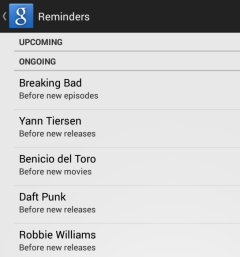
If you search Google for music artists, actors, books, TV shows and you're logged in, you'll see a new "Remind me" button in the Knowledge Graph card. Click the button and "Google Now will remind you about new releases/movies/episodes on your phone or tablet".


Until now, you could add time-based and location-based reminders to Google Now. These new reminders are special and can only be added from Google search. You can manage them from the Google Search app on your mobile device: just go to Settings, My Stuff and select Reminders.


This feature was added last week, when the Google Search app for Android was updated.

Sunday, 23 June 2013

Google Now's Topics Page Is Back

Back in March, I posted about a page that lists the research topics that are displayed by Google Now, but the page stopped working after a few days. Now it works again, has more features and it's no longer limited to Android devices.

Just go to www.google.com/now/topics/ and you'll see a long list of topics related to your recent searches. They're based on your search history and should only show up if you performed multiple related searches about a topic.


Click one of the topics and you'll get a list of search results that are supposed to be helpful. You'll see reviews, forum threads, news articles, videos, web pages and other related topics.


It's interesting to notice that Google uses the Knowledge Graph to generate related people, music, movies, hotels and more. There are publicly available topics pages like this one.


The results aren't always great, as you can see here:


{ Thanks, Anthony Raffini. }

Sunday, 16 June 2013

Knowledge Graph and Google Bombs

Google bombing has a new meaning, with the introduction of the Knowledge Graph. From [more evil than Satan himself] to [miserable failure], Google bombs were created by getting many web pages to link to the target homepage and use the same anchor text. For example, Microsoft haters linked to Microsoft's homepage and used this anchor text back in 1999: [more evil than Satan himself]. After a few months, Google's top result for [more evil than Satan himself] was Microsoft's homepage. Google's "I'm Feeling Lucky" button made Google bombs more popular, many people thinking that Google modified search results pages.

Here's a screenshot from 1999, well preserved by bedope.com:


... and the well-known political message "miserable failure" (screenshot from 2007):


Google started to use some algorithms to defuse bombs in 2007, but there are still ways to artificially inflate Google rankings for a page to show your opinion. For example, when you search for [completely wrong], Google shows pictures of Mitt Romney, the Republican Nominee for the US Presidential Election in 2012.


Knowledge Graph brings a new meaning to Google bombs. If you search for [kłamca], you'll get a Knowledge Graph box for Donald Tusk, the Prime Minister of Poland. "Kłamca" is a Polish word that means "liar". In fact, many of the top results for [kłamca] are about Donald Tusk, who is no longer popular in Poland.


Apparently, this Google bomb has been reported back in 2010 by Polish news sites. Back then, the top search result for [kłamca] was the Wikipedia page for Donald Tusk. Now Google shows an entire sidebar with information about the Prime Minister of Poland.

This reminds me of a screenshot from 2009. This time it's from Bing:


As Search Engine Land noticed, when you search for [miserable failure] using Google right now, you get an info pane about Google bombs and some disambiguation links for George W. Bush and political Google bombs.


{ Thanks, Jerzy. }

Friday, 14 June 2013

Google No Longer Mentions Data Sources

There's an entertaining video that shows 2 Google employees (Mike LeBeau and Amanda Rosenberg) finding answers to various questions using Google Glass.


One of the questions is: "who sings that song where the guy goes 'How Bizarre'?" Google Glass provides the right answer (OMC) and lists a few sites that mention this answer. I asked a similar question using the mobile Google Search app and Google displayed the following message below the answer: "mentioned in results below".


It's nice to see that Google understands verbose questions. Unfortunately, Google no longer mentions the sources that provide the answer. For example, a query like [everest height] used to return an answer, followed by a list of sources.


Here's how it looks today, after the upgrade to the Knowledge Graph:


Google extracts facts from various web pages, so listing some of the sources is appropriate and helps users find reputable sources of information. If the answer is wrong or it's no longer accurate, Google can always point to the sources. As Wikipedia says, "verifiability means that people reading and editing the encyclopedia can check that the information comes from a reliable source".

Google mentions that the "Knowledge Graph isn't just rooted in public sources such as Freebase, Wikipedia and the CIA World Factbook. It's also augmented at a much larger scale because we're focused on comprehensive breadth and depth. It currently contains more than 500 million objects, as well as more than 3.5 billion facts about and relationships between these different objects. And it's tuned based on what people search for, and what we find out on the web."

Here's an example of wrong answer: Google's answer for [hardware wars running time] is 60 minutes, even though the right answer is 13 minutes.


Another wrong answer: Hardware Wars was actually released in 1978.

Saturday, 1 June 2013

Google's Calorie Counter

Google can now answer questions about nutrition, but it's strange to see that this feature only works if you use voice search in Android, iOS or Chrome. "You will be able to quickly and easily find extensive nutrition information for over 1,000 fruits, vegetables, meats and meals in search. From the basics of potatoes and carrots to more complex dishes like burritos and chow mein, you can simply ask, 'How much protein is in a banana?' or 'How many calories are in an avocado?' and get your answer right away," informs Google.

It works for general questions like 'how many calories are in carrots' or for queries like 'carrots calories'.


By default, Google shows the number of calories in a medium carrot, but you can pick a different serving size: 1 slice, 100 grams, 1 cup grated and more. For now, you can't enter a custom serving size.


You can also disambiguate your query. If you search "tuna calories", you can select from bluefin, skipjack and yellowfin. Unfortunately, the list is incomplete and you can't select canned tuna.


Google shows a knowledge graph card with information from Wikipedia and nutrition facts, so you can quickly find the amount of saturated fat, cholesterol, protein or vitamins and minerals without clicking a search result.


And it's not all about calories. You can also ask: 'how much protein is in an egg?', 'how much cholesterol is in chicken?', 'how much saturated fat is in butter?', 'how much sugar is in Coca Cola?', 'magnesium in an apple', 'vitamin C in parsley'.


The feature only works in English and it's gradually rolling out, so it may not work for you. Try it in Android's Google Search app, Google's app for iOS or in Chrome (click the microphone icon from the search box).

Wednesday, 15 May 2013

Conversational Voice Search for Desktop

Amit Singhal announced at Google I/O that this is "the end of search as we know it". The future of search goes beyond search results and it has more to do with answering questions, conversations and anticipating user's intentions.

Google has 3 products with similar goals: Knowledge Graph, Voice Search and Google Now. They go hand in hand to deliver the future of search today.

Voice Search has been available on the desktop if you're using Chrome, but now it's much better: it has been upgraded to the conversational voice search released last year for Android and iOS. Just click the microphone icon from the Google search box, ask questions and you'll get a spoken answer. Soon you'll be to just say "OK Google" to trigger voice search.


Google Search for Android added some new Google Now cards: reminders, last train home (Japan only), real time public transit updates and recommendations for books, games and music albums. Google Now can understand things like "remind me to call Susan tomorrow at 10", "when I go to Rome, remind me to buy a new suit" or "remind me to meet Dan when I get to work". You can create both time-based reminders and location-based reminders.


Voice Search is getting more sophisticated, the Knowledge Graph has more facts and connections between concepts, while Google Now gets smarter and tries to anticipate your searches.

{ via Inside Search blog }